Debian on QNAP TS-409
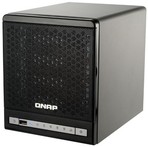
The QNAP TS-409 is a NAS device that can be used for a variety of tasks. In the following, I will describe what is needed to get Debian running on your TS-409, TS-409 Pro or TS-409U.
Please note that Debian 10 was the last release to support these devices. Debian 11 (bullseye) is not supported.
Information
- An installation guide for Debian on the QNAP TS-409.
- A set of Frequently Asked Questions (FAQ).
- A list of known issues and bugs with Debian on the QNAP TS-409.
- Troubleshooting information with common problems and their solutions.
- Some tips and tricks about running Debian on the QNAP TS-409.
- A status page showing which components of the TS-409 are currently supported.
- An internals page listing the specs of the TS-409.
- An image gallery with various pictures showing the internals of the TS-409.
- Information about the recovery mode.
- Instructions for restoring the original QNAP firmware.
- Connecting a serial console.
- Instructions for using U-Boot (if you have a serial console). U-Boot is the boot loader used by QNAP.
External Resources
- Information about QNAP devices at NAS-Central.
Help
If you have problems with Debian on QNAP TS-409 and cannot solve them with Google, there are the following resources you can consult:
- The debian-arm list for questions specifically related to the ARM port of Debian or about running Debian on the QNAP TS-409.
- If you don't want to post to a mailing list, please post to the Debian area on the QNAP forum.
- For questions about the QNAP TS-409 that are not related to Debian, please use the QNAP forum.
Acknowledgements
A lot of people helped to make Debian on QNAP Turbo Station possible. The folks at QNAP have been very supportive of this effort and have supplied some hardware and technical expertise. Marvell has done a fabulous job integrating Orion support into the mainline kernel. Sylver Bruneau added kernel support for the TS-409. Frans Pop packaged qcontrol for Debian and helped with the development and testing of the Debian installer.